Every change, documented.
Every fix, improvement, and new feature, in order.
Image Analysis
Toqan can analyse the visual content of images, not just transcribe text from them. Works across all chats and models, including those without a native images API.

Model Intent on Tool Calls
Toqan now shows why it's calling a tool before it runs, so you can follow its reasoning in real time. Console commands running in the sandbox (grep, cat, ls, etc.) are also displayed.

Delete an App
Apps you own can now be deleted from the gear icon on the app page.

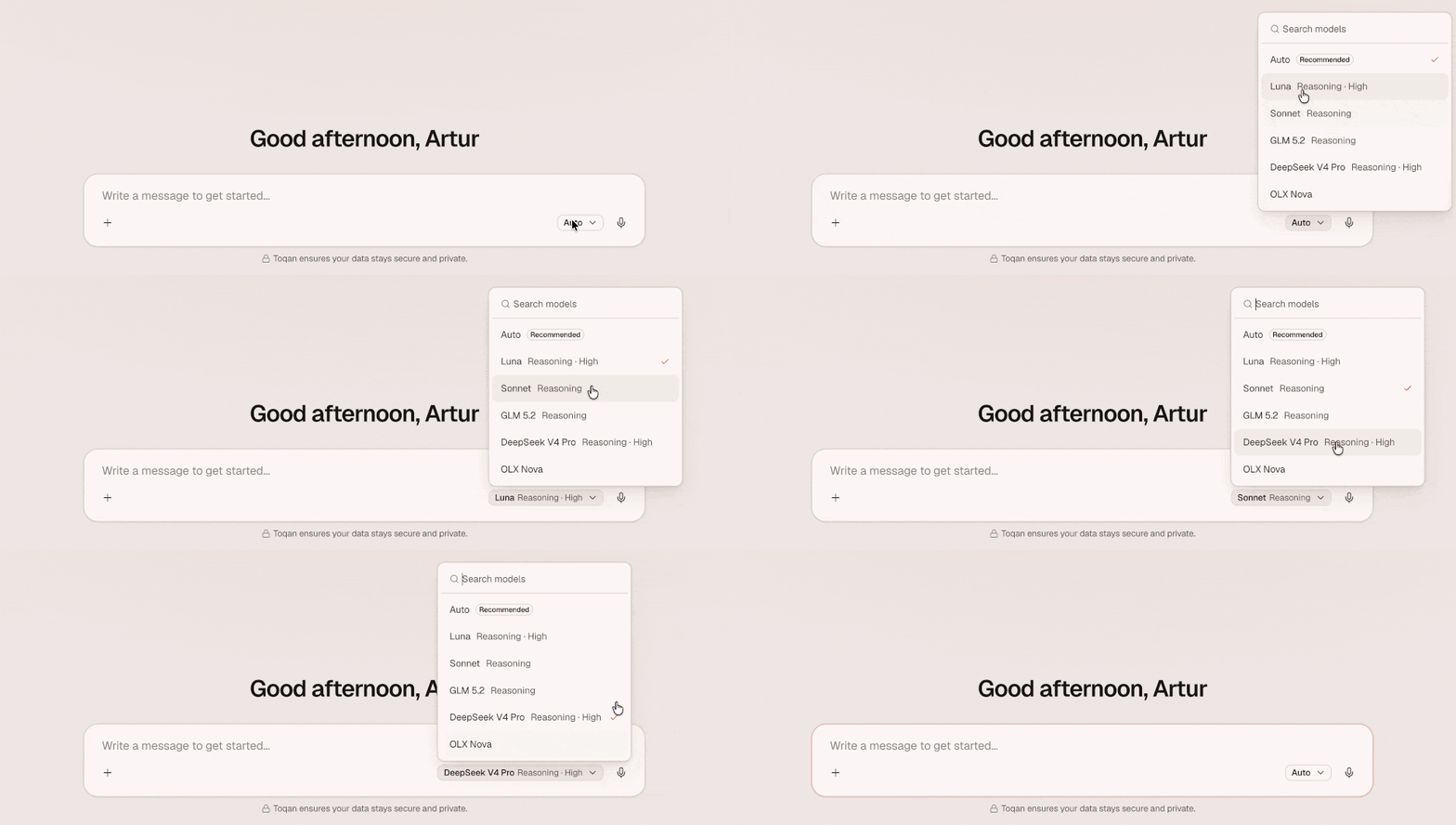
Model Selector
You can now select a specific model for Toqan, choosing the one that best fits your task.
Skill Selector
Type / in chat to see and search all available skills, then select the one you want to use.

Pin an App
Pin any app to keep it within reach. Pinned Apps appear on the left nav, below Pinned Chats. If you pin an app from the Marketplace, it also shows up in the Apps tab.
Marketplace
Every shared app and skill now lives in the Marketplace. Browse by Trending, New, or Templates to discover what others have built. The old Apps tab is now shows only the apps you built and the ones shared directly with you.
Connection Suggestions
When you type the name of a connection you are not connected to, a suggestion chip appears near the prompt so you can connect and authorize in one place.
Queuing Prompt Messages
You can now queue messages while a response is still streaming, and they will automatically send once the current chat finishes.
App Descriptions and Preview Images
You can now add a description to your app and upload a preview image, which appears on the new app card design in the marketplace and on My Apps.
Runtime App Logs
Toqan can now retrieve runtime logs from apps, helping you debug broken deployments, fix bugs, and confirm that they run as expected. This makes it easier to troubleshoot existing apps and develop new ones.
App Templates
App Templates are now available, providing pre-built apps as starting points.
Chat to Edit your App
You can now open the original chat directly in the App View and tell Toqan the edits you want to make to your app. Click the 'Chat to edit' button in the top-right corner of your app.
Databases
Your app can now collect and hold data in a database, and ToqanClaw can read and write to the same database to process, enrich, and act on that data.
Ask Toqan
Select any text in your chat and click 'Ask Toqan' to append it to your next conversation and get more information about the highlighted text (up to three snippets at a time)
Memory V2 and Dreaming
Memory V2 and Dreaming are now available to all users. Memory learns facts and preferences from your conversations, while Dreaming transforms those logs into long-term memory and cleans up the context file.
Sub-Agents
Agents can now invoke other Agents as sub-agents during conversations, delegating tasks that process independently with their own tools, custom instructions, and MCP configurations before returning results to the orchestrator
File Preview: Image, PPT, and DOCX
Image attachments now display inline previews in chat, and PowerPoint (.pptx) and Word (.docx) files can be viewed directly in the file viewer, without having to download.
More Space for Your Apps
Apps now have more space on the page. You can also open an App in a new browser tab.
Improved Latency on Longer Conversations
The system now responds faster, especially during longer conversations.
New Unified Interface
Toqan now has a single unified interface combining all capabilities from Flamingo and Claw. Everything is on the left sidebar.
Pin Conversations
Users can now pin/unpin chats in their Conversations history to keep frequently accessed threads at the top of the list for fast access.
App Sharing
App owners can now share their Toqan apps. Set access to Private, Your organization, or Prosus group, and copy the shareable link (optionally invite specific people by entering their email addresses).
PDF & PPT File Naming
Toqan now generates better PDF and PowerPoint file names using the actual project content. For example, 'my-project.pdf' or 'my-project.pptx' instead of the generic 'Deck' filename that was applied regardless of the project.
Google Workspace MCP
Support to Google Workspace via MCP, letting you connect Gmail, Calendar, Drive, and To-Do Lists directly from your workspace. IT admins may need to approve the app before users can authenticate.
Workspace Export/Import
Export your workspace as a backup file and import it into another workspace. Temporary files like 'node_modules' are excluded from the export, conflicting files are replaced by the imported version.
Dutch Language Support
The Dutch language option is now available for selection in your account settings. Users can switch their UI language to Dutch from the language preferences panel.
Skill Marketplace
Share skills across your organization and group. Browse the marketplace to download, install, and start using skills in just a few clicks.
Rich Conversation Transcript
Conversations now show a live activity strip, tool calls, referenced files, sub-agent hand-offs, and attention banners for approvals or failures, all inline as they happen.
Test & Chat Panel on Agent Edit
Build and test your agent without leaving the editor. A new side panel gives you a Test mode against the current draft and a Chat mode against the published version, each with its own conversation history.
ARC: Context Compression for Long-Running Agents
Agents running long workflows no longer lose critical context. ARC (Abstracted Record of Context) replaces generic compression with structured summarization and selective retrieval, storing exact data references, file trails, and decision history on demand.
Custom Tools API Reference Generator
Build a custom tool and Toqan auto-generates a structured API reference page your agents can read, so they always know exactly how to call it, no more wrong parameters.
Stop Button
Stop a response mid-stream without waiting for it to finish. Change direction, refine your prompt, or cut it short, whenever you want.
Agent Scheduling
Set an agent to run on a schedule and let it go. Pick the agent, write the prompt, choose a date range and frequency, and Toqan handles the rest automatically, no manual triggers needed.
Suggested Prompts
Add suggested prompts to your agent home screen so users know exactly how to get started. Quick-start options that show what the agent can do, less onboarding, faster value.
Multi-Language Support
Toqan now speaks Portuguese, Spanish, and Polish alongside English. Switch your preferred language any time from the account menu in the bottom left.
Rate Limits and Budget Controls
API access to agents now runs on a structured tier system. The free tier gives you 200 requests per hour, always on. The production tier runs at 50 requests per minute with monthly budgets that users request and admins approve directly in the platform. Regular conversations and Slack are unaffected.
Background Tasks
Agents now run in the background 24/7, triggered by events from other platforms. Your agents handle the work before you even know it needs doing, no manual kick-off, no need to be online.
MCP Marketplace
Admins can now configure integrations once and share them across the entire workspace. Users get one-click access to every connection they need, no credentials, no setup, no waiting for IT.
OAuth and Central Authenticators
Set up OAuth authenticators once and reuse them across all your custom tools and MCPs. Agents always authenticate as the right user, and teams building custom integrations get enterprise-grade security out of the box.